
A study of whether AI can build not just a site of text pages, but a WordPress project with its own data: tracks, maps and statistics. The result: hiking.fixops.pro
Why I did it
AI can build a site of text pages today without much trouble: headings, paragraphs, images, a menu. I was interested in something else. I wanted to see whether AI could handle a site that works with specific data, in my case GPS tracks.
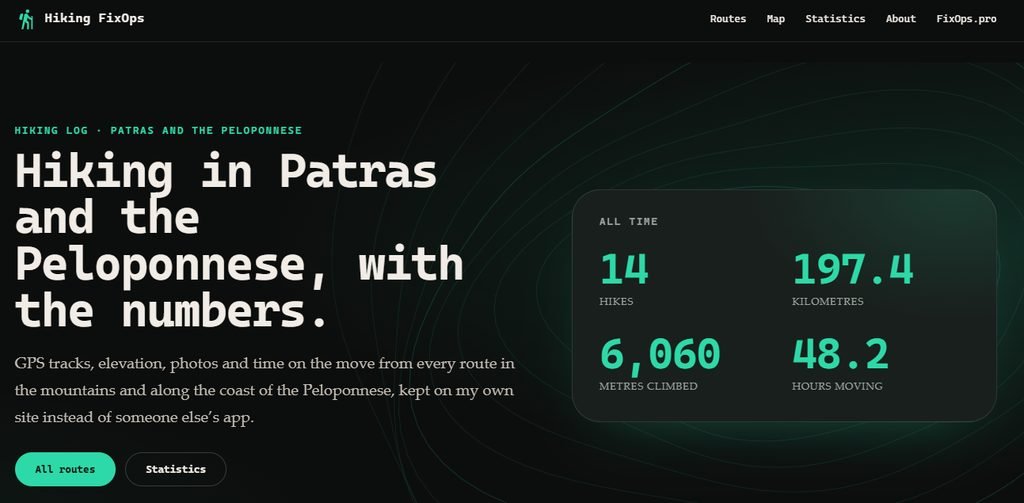
The data is real: it is a record of our own family hikes in the mountains around Patras and on the Peloponnese. I did not want to keep it in someone else's app. I needed my own log where every hike is a track on a map, an elevation profile, photos and numbers, and where the site as a whole shows the big picture: how many hikes, kilometres, metres climbed and hours on the move.
The standard toolkit is not enough for this. The site needs to:
- accept GPX files and parse them on the server;
- calculate distance, ascent and descent, moving time and difficulty;
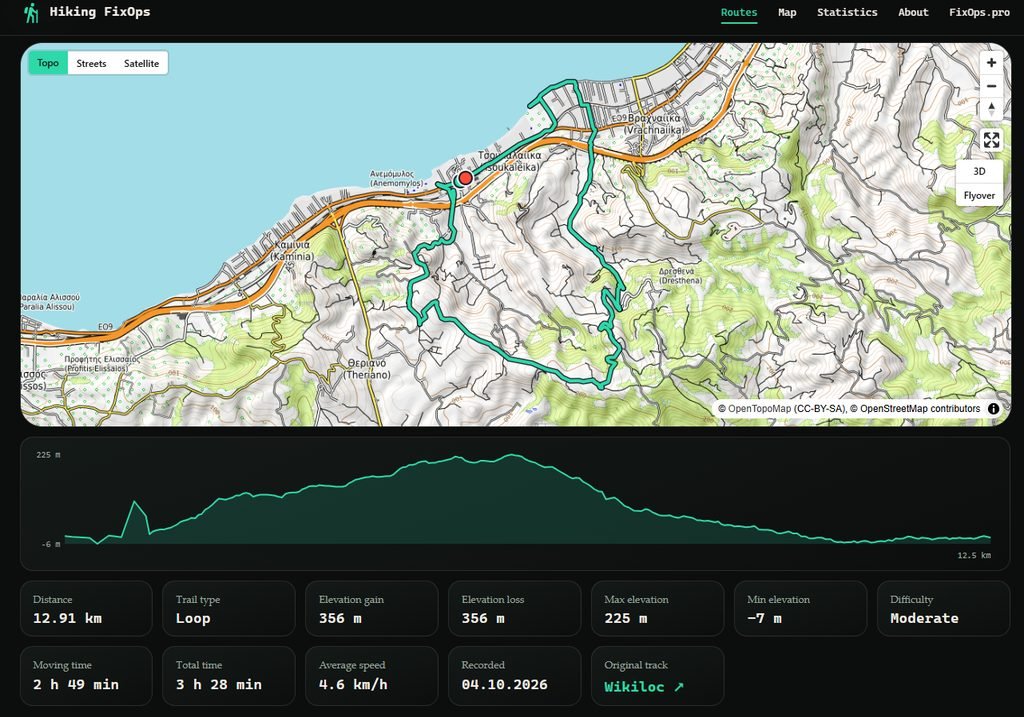
- show a route on an interactive map with an elevation profile;
- attach photos to points on the track;
- gather overall statistics and records across all hikes;
- hide what is private: the original files and places near home.
This is no longer "make a theme and fill it with pages". It is the development of a plugin and a theme that work as a single system.
Architecture: a plugin for data, a theme for looks
From the start the task was split into two parts with a clear boundary.
The FixOps Trails plugin (version 0.6.0) is responsible for data and logic. The Hiking FixOps theme (version 0.1.3) is responsible only for appearance. The theme calculates nothing: it takes the plugin's ready-made blocks and styles them. The plugin still works in any theme thanks to its base styles, and the theme overrides the same semantic fxt-* classes.
I wrote this split into the specification before the first line of code, and it turned out to be the key decision of the project. AI is much more reliable when each component has one area of responsibility and a clear contract with the others.
What the plugin does
- A track from GPX. A file is uploaded to a post (for example, an export from Wikiloc). The server calculates distance, ascent and descent, maximum and minimum elevation, moving and total time, average speed, whether the route is a loop or point to point, and difficulty.
- Bulk import. "Posts → Import GPX" turns one or many files into posts in one step: the title comes from the track, the date is set from the track date, duplicates are skipped, and a cover image is drawn automatically.
- Map and elevation profile. The
[fx_trail]shortcode shows a map (built on MapLibre), an elevation profile whose cursor moves a marker on the map, statistics cards and a gallery. - Photos. JPEGs are resized and converted to WebP, GPS position and time are read from EXIF before the metadata is removed, and photos are placed on the track by coordinates or by capture time.
- Privacy. The original GPX is kept in a protected folder, and the public map hides the first and last 200 metres of a route.
- The big picture.
[fx_trails_map]shows all routes on one map coloured by year,[fx_trail_stats]gives totals, a 12-month chart and a table by year, and[fx_trails_list]gives a list with filters by year, difficulty and distance. - Route planner. For hikes we have not done yet: the route follows trails through OpenRouteService, and the time is estimated from my own pace on past hikes. Planned routes are not counted in the statistics.
In size it is about twenty PHP classes and several JavaScript modules: a real plugin, not a prototype stub.

The theme and the design system
I deliberately built the theme with the tools WordPress supports out of the box, without external page builders: a block theme with theme.json, templates, template parts (header and footer) and patterns. It has about forty files, no unnecessary dependencies and no web fonts.
A design system prepared in advance
I want to point out how the design question was solved. I did not ask AI to "come up with a beautiful site". I already had a ready design system for the main fixops.pro site, described in a separate document, and the theme took all the essentials from it:
- a dark colour scheme with a single green accent colour;
- one system of corner radii: moderate on cards, fully round on buttons and labels;
- a scale of font sizes and large fluid headings;
- a monospaced font for headings, numbers and buttons;
- a distinctive glowing block for key numbers.
All the values were moved into theme.json, and the site's pages are built only from them. As a result hiking.fixops.pro looks like a "younger sibling" of the main site, although AI did not invent a single colour or a single spacing value.
The practical takeaway: AI works very well from a ready design system and copes worse when it has to invent a design from scratch. Ready tokens give it firm limits, and give me a predictable result without endless "a bit darker, a bit bigger" edits.
What the theme includes
- Front page: a block with overall statistics (hikes, kilometres, ascent, hours on the move) with a count-up animation, the latest five routes and three record cards.
- Page templates: Routes (a list with filters), Map (the combined map), Hiking statistics, About, a single hike page, archive, search and 404.
- Convenience: on activation the theme creates the pages it needs without touching existing ones, the mobile menu opens full screen, the current menu item is highlighted, and text contrast is checked by a test.
How the AI worked
The process was closer to the work of a small team than to "generate a site for me":
- Specification. First the goal, the decisions already made, design tokens, the structure of the front page, what the plugin must add, the phases, the risks and what is out of scope.
- Plan. The work was broken into seven steps with dependencies between the plugin and the theme.
- Test-driven development. For every task a failing test was written first, then the code. The checks include static theme checks, WordPress tests on a test site, a contrast check, no horizontal scrolling at 375 and 768 pixels wide, and a clean browser console.
- Independent review. At the end a separate "fresh" reviewer, who had not seen the development process, checked the code. It found real bugs: the header did not stick on scroll, the cache key did not include the plugin version, password-protected posts leaked into public lists, and the map and statistics were empty for visitors on an empty site. All of it was fixed, with tests.
- Decision log. Minor issues I decided not to fix right away are recorded in a log instead of being lost.
- Release. Archive builds, checksums and a detailed deployment guide with a section on secure installation: checking that the protected folder with the original GPX files cannot be reached from a browser, API keys kept in the configuration, comments disabled, and current versions of WordPress and PHP.
My role as the engineer: I made decisions, looked at the result and added requirements as we went. For example, the automatic cover drawn from the route shape, the three icon lines of statistics on a card and the regional wording in the texts all came from my requests during the work.
Why WordPress is convenient for prototypes
Projects like this are convenient to start and validate on WordPress, and it is not only a matter of habit.
- Cheap, simple hosting. Unlike specialised frameworks such as NestJS, a WordPress site can be deployed on any inexpensive shared hosting. No separate server, containers or environment setup are needed: for a prototype it is enough to upload an archive through the admin panel.
- A ready foundation. WordPress already does what other frameworks make you build again, spending time and AI tokens: user authentication and roles, an admin panel, a content editor, routing and permalinks, a database with post types and custom fields, a media library, search, archives and RSS.
- Content can be edited without a developer. Text, pages and menus are edited in the block editor, so there is no need to touch code.
- Clear extension points. The system of hooks, shortcodes, blocks and templates lets you add features with a plugin without changing the core. AI finds its way around such a structure well, and the boundaries between components come out naturally.
- AI knows WordPress well. The huge volume of documentation, examples and open source code means it solves typical tasks on the first try and is less likely to invent functions that do not exist.
- Simple installation and rollback. The plugin and theme are installed from an archive and updated or rolled back with the same archives. No build step, CI or deployment pipeline is needed.
- An ecosystem for the future. If the prototype takes off, caching, SEO, multilingual support, forms, backups and security are available as ready-made plugins. If it does not, the loss is minimal.
- Easy testing. A test site comes up locally in minutes, and the WP-CLI command line tool gives AI a convenient way to check results automatically.
- Versions and drafts out of the box. Post revisions, drafts and preview help you experiment safely on live data.
- Security updates. The core and plugins receive updates, so a prototype does not turn into abandoned code from day one.
What is not perfect
An honest list of limitations:
- a few minor shortcomings of the current implementation are not fixed yet: they concern individual templates, filters and dates and do not stop the site from working;
- AI sometimes solved a task at a level that looked right while a check revealed a gap. Without tests and an independent review I would have found some of the bugs on the live site;
- documentation and specifications need a human's attention: AI happily writes a lot, but deciding what of it is needed is the engineer's job.
Summary
The experiment showed that AI is suited to more than sites made of text pages. With its help, a WordPress project with its own domain logic can be built in a short time: GPX parsing, maps, elevation profiles, photos on the track, statistics and a planner. For rapid prototyping and launching projects, AI works well if a few conditions are met:
- A clear architecture. Data and logic in the plugin, presentation in the theme, and the contract between them described in advance.
- A ready design system. It gives a predictable look and removes the most endless part of the work.
- A specification and a plan before code. Then AI works step by step instead of "everything at once".
- Tests and independent review. This is what separates a project that works from one that only looks like it works.
- The engineer makes the decisions. AI speeds up implementation, but the goal, the priorities and the acceptance are set by a person.
Bottom line: from the idea to a working site with my own data about our family hikes took days, not months. For personal projects, prototypes and first versions of commercial products this changes the economics of launching: testing an idea has become cheaper than discussing it.